This article walks through Apex Z, a Apex Z trading strategy. It covers the strategy logic, signals and parameter settings, and ships ready-to-use MT4 / MT5 EAs with source download and live position tracking so you can evaluate and deploy it fast.
Magic 1000013
[tv_ticker]
Statistical PrecisionMeets Market Rhythm
Apex Z-Reversion is an alternative quantitative framework designed for ranging and mean-reverting market regimes.
It leverages Z-Score statistical analysis to detect overextended price action, confirmed by momentum,
volatility structure, and a low-trend regime filter (ADX).
CORE EDGE
Z-Score ±2.0
Statistical extreme detection
REGIME FILTER
ADX < 25
Low trend / ranging only
RISK RULE
1%
Max risk per opportunity
Recommended Timeframes
H1 • H4 • Daily
LIVE READY
Best Markets
Major Forex Pairs, Indices, Gold
Style
Mean Reversion • Counter-Trend (Regime Filtered)
Execution
Fully Automated (EA) or Manual
DETAILED RULES
Core Logic & Execution Rules 核心逻辑
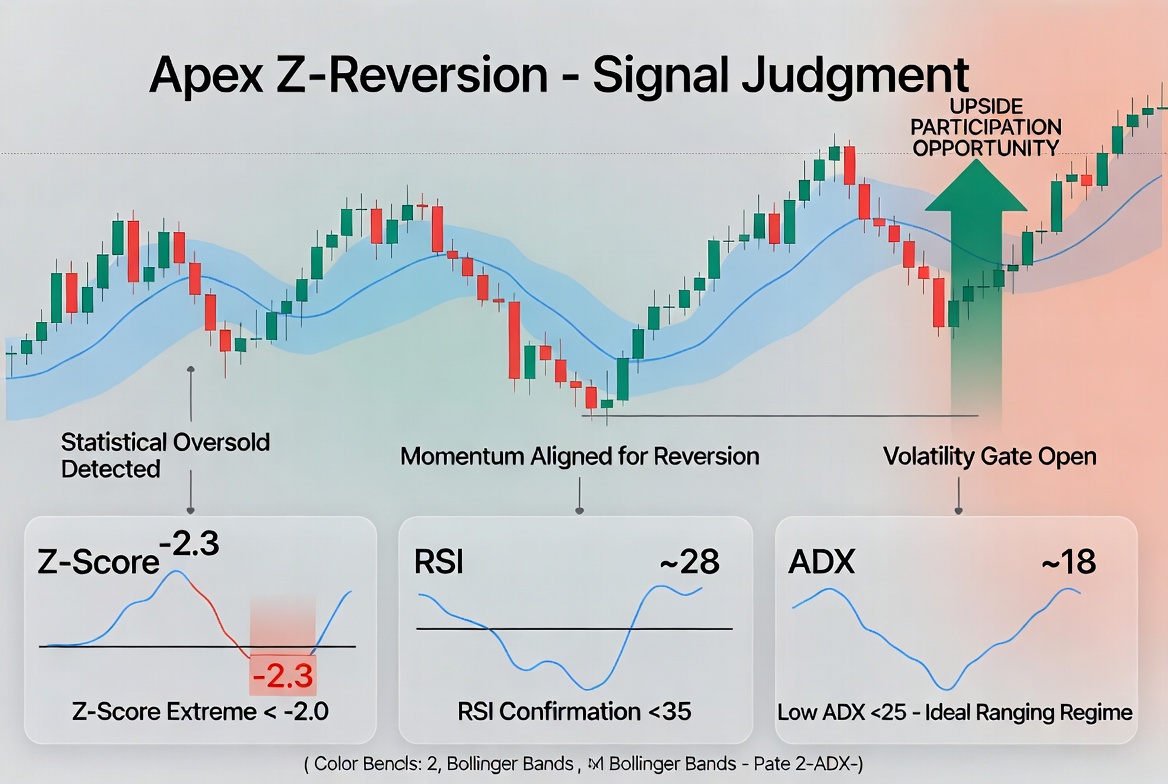
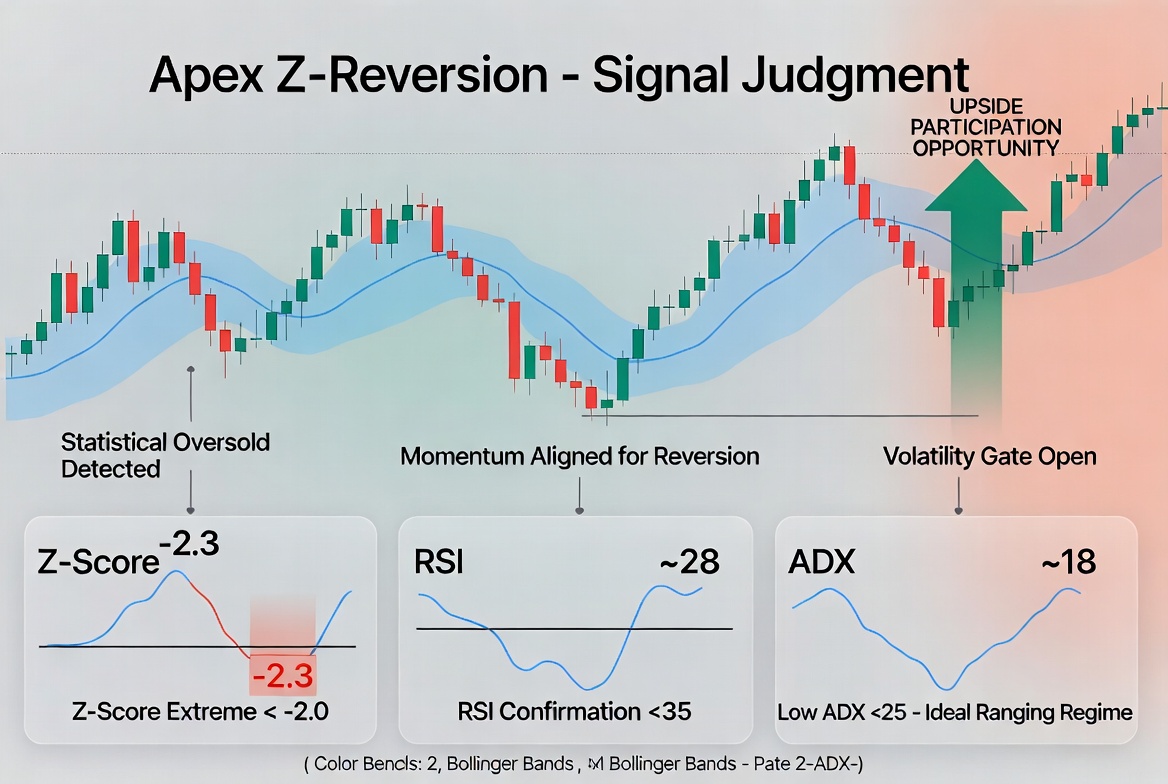
Upside Participation Opportunity
LONG SETUP
- Z-Score (20) < -2.0 — price statistically oversold vs its mean
- RSI (14) < 35 — momentum confirmation of exhaustion
- Price near or below lower Bollinger Band (20, 2.0)
- ADX (14) < 25 — ranging / low-trend regime confirmed
- Optional: Price above 200 EMA (trend alignment filter)
Downside Participation Opportunity
SHORT SETUP
- Z-Score (20) > +2.0 — price statistically overbought vs its mean
- RSI (14) > 65 — momentum confirmation of exhaustion
- Price near or above upper Bollinger Band (20, 2.0)
- ADX (14) < 25 — ranging / low-trend regime confirmed
- Optional: Price below 200 EMA (trend alignment filter)
Risk Management & Harvest Rules
STOP LOSS
1.5 × ATR(14) below/above entry price. Alternative: recent swing high/low. Hard protection of capital.
TAKE PROFIT (Partial)
TP1: 1.0 × ATR — close 50% of position and move remaining SL to breakeven. Locks in partial harvest.
TAKE PROFIT (Full)
TP2: 2.5 × ATR or when Z-Score reverts toward 0. Full exit on statistical mean reversion completion.
Position sizing strictly calculated to risk exactly 1% of account equity per opportunity. Maximum 3 concurrent opportunities. No pyramiding. Discipline-first execution.
FULLY CUSTOMIZABLE
Strategy Parameters 参数设置
All values optimized for robustness.
Adjust per market & timeframe.
| Parameter | Value | Description |
|---|---|---|
| Z-Score Period | 20 | Lookback for mean & standard deviation calculation |
| Z-Score Threshold | 2.0 | Extreme level triggering potential opportunity |
| RSI Period / Oversold / Overbought | 14 / 35 / 65 | Momentum confirmation filter |
| Bollinger Bands Period / Deviation | 20 / 2.0 | Volatility structure & extreme price location |
| ATR Period / SL Multiplier | 14 / 1.5 | Dynamic stop loss distance |
| ATR TP1 / TP2 Multipliers | 1.0 / 2.5 | Partial & full harvest targets |
| ADX Period / Max for Entry | 14 / 25 | Regime filter — ranging markets only |
| EMA Trend Filter Period | 200 | Optional major trend alignment (reduces counter-trend risk) |
| Risk per Opportunity | 1.0% | Strict position sizing rule |
| Magic Number | 20260509 | Unique EA identifier for order management |
SIGNAL & PROCESS[tv_analysis symbol=”XAUUSD”]
Visual Examples
Clear, professional illustrations of signal judgment and execution flow
Signal Judgment
ENGLISH
Example of Z-Score extreme, RSI confirmation, low ADX regime, and entry signal with SL/TP levels.
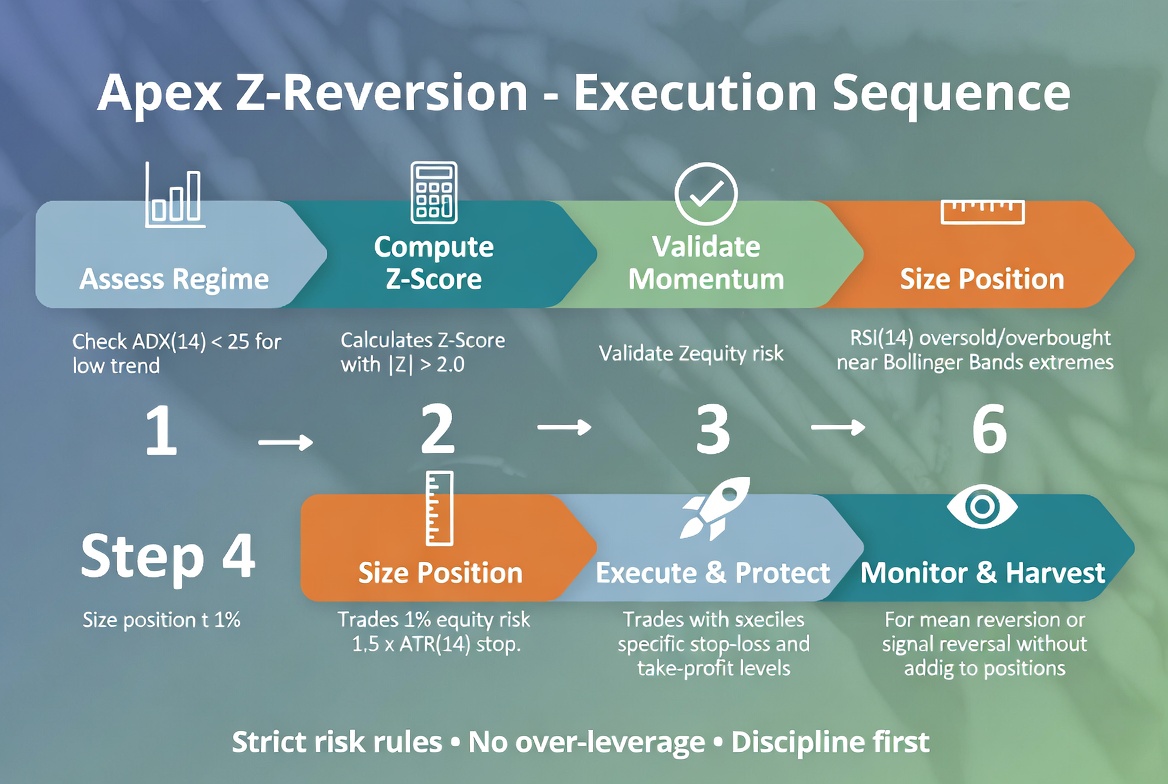
Execution Sequence
ENGLISH
Step-by-step professional workflow from regime assessment to harvest management.
How to Use This Strategy
1. Installation
Copy the MT4 (.mq4) or MT5 (.mq5) EA file into your platform’s Experts folder. Restart the terminal. Attach to desired chart (recommended H1 or H4).
2. Configuration
Adjust parameters in the Inputs tab according to the table above. Enable “Allow Algo Trading”. Start with default 1% risk on a demo account.
3. Monitoring & Optimization
Review open positions in the terminal. Use the visual flow as a checklist. Backtest on multiple pairs and optimize Z-Threshold or ADX max for specific instruments.
Pro Tip: Combine with higher-timeframe bias. The strategy performs best when the higher timeframe (Daily) is not in a strong trending regime.
IMPORTANT DISCLAIMER: This document and the associated strategy are provided for educational and informational purposes only. They do not constitute financial, investment, or trading advice. Trading and investing in financial markets involve substantial risk of loss and are not suitable for all investors. Past performance, backtest results, or simulated performance are not indicative of future results. The developer and publisher assume no liability for any losses incurred through the use of this strategy or materials. Always conduct your own thorough research and consult with a qualified financial advisor before making any investment or trading decisions. Risk capital only.
[mt5_calc_spread][tv_ticker]
Source & Download
1. Place the EA file in
MQL5/Experts/ folder2. Add
https://jybj.org to WebRequest whitelist: Tools → Options → Expert Advisors → Allow WebRequest for listed URL3. One invite code = one account (non-transferable)
Ready to use · MT4 / MT5 · Parameters preconfigured 即开即用,参数已预设
📥 Download C017Apex_Z_Reversion_EA_MQL4_merged.ex4 (.ex4)
📥 Download C017Apex_Z_Reversion_EA_MQL5_merged.ex5 (.ex5)
Source code & compiled files: GitHub
Full documentation: Online strategy page
Live performance: View all strategies →
Live Positions 实时持仓
[mt5_position magic=1000013]
Related Trading Strategies
Want to compare more automated strategies? These related ones are worth a look:
- Nebula Pulse Breakout | Professional Alternative Trading Strategy — related strategy — compare parameters and live positions
- EchoBand Protocol | Professional Quantitative Market Participation System — related strategy — compare parameters and live positions
- Confluence Sentinel Protocol • Professional Trading Strategy — related strategy — compare parameters and live positions
Apex Z Trading Strategy FAQ
Which symbols and timeframe does Apex Z suit?
Apex Z adapts to major FX and gold symbols; validate on demo first. Fine-tune for your broker’s spread and leverage, and rely on demo results before going live.
How do I download and run the Apex Z MT4/MT5 EA?
The Source & Download section provides compiled MT4/MT5 files and source. Drop it into MT5’s Experts folder, restart, and attach it to a chart — parameters are preset.
What are the risks of the Apex Z trading strategy?
No trading strategy guarantees profit; past and backtested results don’t predict the future. Run it on demo, cap per-trade and total risk, and understand the logic before trading live.
Further Reading
Risk Warning: The results shown are based on simulated or historical trading data. Past performance is not indicative of future results and does not constitute investment advice. Trading involves risk; please proceed with caution.
风险提示:本文所示为模拟/历史交易数据,过往表现不代表未来收益,不构成任何投资建议。